The free plan
Your store free for the first months
- Sign up with your email and your phone number, and your online store is ready within minutes.
- Unlimited products and orders, and no percentage of your sales.
After the free months: .
The details are in the free plan’s terms.
The current round of free stores is full. Reserve your place in the next round.
Special offer
The first year of Basic for instead of
For a limited number of shops, until 30/11/2026.
- Your online store is ready within minutes of subscribing.
- This offer’s guarantee: if you do not like your store within two months of paying, we give you all your money back.
- Unlimited orders and products, and no percentage of your sales.
- We help you add your first products.
The offer code FIRST20 is applied on the subscribe page, and you pay by card. After the first year the subscription renews at the plan’s yearly price (). The details are in the Terms of use.
This offer has ended. Both plans are still there, as in the plans table.
You won’t start alone
You talk directly to the platform’s owner, not to a salesperson.
If this is your first online store, we explain every step until your first order arrives.
We help you add your first products to your store.
And we stay with you after launch for any question.
- Home
- E-commerce
A complete online store for your shop. Sell as much as you want.
A storefront your customers shop from and an admin panel in Arabic, with unlimited orders and products, from . Built first for a real Iraqi shop that sells every day.
Sell as much as you want.
Two plans, and orders and products are unlimited on both: no cap on orders, none on products, and no percentage of your sales. The plans differ by what you want, not by a limit on what you sell.
Both plans are made for small and medium shops. Is your store large? We will agree with you on what suits it.
| Feature |
The first months free
Basic
The price is on the subscribe page |
Pro
The price is on the subscribe page |
|---|---|---|
| Orders and products | Unlimited | Unlimited |
| Staff and reps | Unlimited | Unlimited |
| The storefront and the admin panel | Included | Included |
| Several templates to choose from | Included | Included |
| Your own domain | Included | Included |
| Cash on delivery and order tracking | Included | Included |
| Couriers: Alwaseet and Albarq | Included | Included |
| Linking to local systems such as Al-Bayan, free | Included | Included |
| Search engines and the ad pixel | Included | Included |
| Chat, news and notifications | Not included | Included |
| Offers | Simple | Advanced |
| Reports | Reports, with Excel export | Deeper analysis, with a customer map |
| Support and tutorials | Video lessons for every section | Video lessons for every section |
| Vera, the AI assistant | Around the clock | Around the clock |
| Answers to your questions (WhatsApp and email) | Within 1 to 2 business days | Within 4 business hours, with priority |
| A fault that stops your store | We start fixing it within an hour, at any time | We start fixing it within an hour, at any time |
| Store uptime, monthly | 99.5% | 99.5% |
| Live support | Sunday to Thursday, 10 am to 6 pm | Sunday to Thursday, 10 am to 6 pm |
| The AI assistant | Gift points with the first subscription | More gift points with the first subscription |
| The loading screen | With Codeator’s mark | With your shop’s name |
| A mobile app for your store | Not included | Included |
| A design made to order | On request, apart from the subscription | On request, apart from the subscription |
Need more than the two plans?
We build your store or your project the way you want it, with the features, the design and the integrations your business needs.
The FIRST20 offer: the first year of Basic for instead of at a lower price, until 30/11/2026. Subscribe with the offer; the details are in the Terms of use.
Country: ·
The AI assistant’s points. The admin panel has an AI assistant that answers your questions and prepares changes for you. It runs on points. Your first subscription comes with gift points, and if you need more you buy a pack in the admin panel, with no new subscription; pack prices are shown there before you pay. Points last a full year from the day they are added, and if they run out your store goes on working as usual. Details are in the terms of use.
Sold by Abdullah Mahmood Abdulqadir Al-Imam: legal notice (Impressum). How a subscription is paid and cancelled: Terms of use.
Already subscribed? Manage your subscription: change your plan, or cancel it.
Every subscription includes complete video tutorials for the platform. Watch them
Everything in the store, in detail
Everything here is on both plans, except what is marked Pro. Tap any feature to read more.
Products
Products and their optionsEach colour and size with its own price, stock and photos.
Add a product with its colour and size options, each with its own price, stock and barcode. Drop each colour’s photos onto its option in one go.
Categories and brandsCategories with icons to browse, and brands with their logos.
Arrange your products in a tree of categories the customer browses, each with its icon, and add brands with their logos.
Attributes and filtersProduct attributes become filters for the customer.
One list of attributes, such as size and material, shared by every product and shown in the store as filters in each category.
Prices and offersThe offer price, with the old price struck through beside it.
One sheet for every option’s price, offer price, cost and margin (for those you allow to see them) and rep price, saved with one press.
Stock that stays rightStock is held with every order, so a piece is never sold twice.
A customer’s basket holds a piece for as long as you set, and you are alerted when a product falls below a level you choose.
“Tell me when it is back”Customers ask to hear when a sold-out product returns.
See who is waiting for each product and how many, and tell them it is back with one press. You choose whether sold-out products stay visible or are hidden.
No limitsNo cap on products, orders or staff.
No cap on products, orders or team members, and no share of your sales.
Storefront and app
Ready-made templatesSeveral free templates, each previewed before you publish.
Each template has its own front page, colours and typefaces, and you preview it on your store before publishing. We add new templates from time to time, free.
Home page slidesSlides with a headline, a picture, a start and an end.
Write the slide’s headline, choose its picture, the page it opens and its dates, and see it on a phone and a desktop before it goes live.
Your store’s identityYour shop’s name, logo and colours, and your branches on a map.
Your shop’s name, logo and colours, an announcement bar across the top, trust lines, your branches on a map and your social accounts. A small line at the foot of every page says the store is by Codeator.
Your own domainYour store on your own domain, or on a subdomain of ours.
The store runs on your own domain, or on an address such as yourshop.stores.codeator.tech.
Customer accountsCustomers sign in with their phone, by a texted code or a password.
Choose how your customers sign in: phone or email. Sign-in codes arrive by SMS through an account in your own name with the SMS provider. Customers see their orders, addresses and notifications in their account.
Like an app on the phoneCustomers add your store to their home screen.
Customers add the store to their home screen with no app store, get a notification at each step of their order, and find them all on a Notifications page.
A loading screen with your name ProBetween pages, your shop’s name instead of Codeator’s mark.
Between the store’s pages, a loading screen shows your shop’s name and logo instead of the one with Codeator’s mark.
The store app ProYour store as an app under your shop’s name and logo.
We publish your store as an app under your shop’s name and logo, for Android and iOS, from our own accounts, so you open no developer account. It stays for as long as your Pro subscription does.
Orders and delivery
Cash on deliveryThe customer pays the courier in cash at the door.
Cash on delivery is how customers pay in the store, with no extra charge to them.
Delivery fee and minimum orderA delivery fee and a minimum order that you set.
Set the delivery fee and the minimum order in the panel’s settings, and change them whenever you like.
The customer’s pin on a mapCustomers can drop a pin on a map when they order.
At checkout the customer can drop a pin, which you see on the order’s page. The nearest landmark is still asked for.
Order trackingClear order states, and a link to follow the order on.
An order moves through clear states from new to delivered, including could not confirm, refused and returned. The customer follows it on a link and is notified at each step.
Orders taken by phoneEnter phone and WhatsApp orders from one screen.
Enter an order that came by phone or WhatsApp, note where it came from, and it joins the other orders. The screen works on a phone as well as a desktop.
Couriers: Alwaseet and AlbarqSend orders to the courier and print their waybills from the panel.
Alwaseet and Albarq are connected: send one order or many at once, print the waybills as one file, and edit a parcel at Alwaseet while it is still at the shop. Needs an account in your own name with the courier. We link your store to any other courier on request.
Picking and bulk actionsSelect several orders and print their picking lists at once.
Select several orders from the list, move them to picking and print all their picking lists on one page.
Exchanges and returnsFollow the pieces an exchange brings back until they arrive.
For an exchange, mark the pieces the courier collects from the customer and follow them until they reach the shop; a sound piece goes back into stock by itself.
Marketing and contact
Chat with customers ProCustomers message you from your store, with text and pictures.
A customer writes to you from your store and sends pictures, and you answer from the admin panel. Conversations are kept for you to go back to.
News for your customers ProYour shop’s news and new arrivals, shown in your store.
Write a piece of news about new stock, an offer or a date, and your customers see it in your store.
Notifications and campaigns ProSend your news to your customers’ phones as a notification.
Turn a piece of news into a notification campaign that reaches your customers’ phones, so they hear of what is new as you post it.
Advanced offers ProOffers beyond a simple sale price.
On Pro, advanced offers on your products, beyond the simple sale price that both plans have.
Abandoned basketsSee what your customers put in the basket and did not buy.
A list of signed-in customers’ baskets, what is in them and when they were left, so you can follow up.
Links that open with a pictureA product link on WhatsApp shows its photo, name and price.
Send a product link on WhatsApp or on social media, and it opens with the product’s photo, name and price.
Search enginesA title and a description for your store that search engines read.
Write your store’s title and description as search engines show them.
Ad pixelsMeta and TikTok pixels to measure your ads.
Enter your Meta or TikTok pixel ID, and the store measures the visits and purchases your ads bring.
Management and reports
An admin panel in ArabicOrders, customers and products in one panel, on phone or desktop.
“Today’s board” shows the work waiting, and each figure opens its list. Every customer has a page with their orders and when they were last seen.
Team and permissionsUnlimited staff, each with a role, and a log of every change.
Add as many staff as you need, with ready-made roles, among them manager, accountant, sales, warehouse, marketer and rep, and a log of who changed what and when.
Sales reps and their accountsReps enter their own orders at their prices; you settle what they earn.
A rep has a screen to enter his own orders at his own prices or discount. “Rep accounts” shows what each rep is owed and what was paid, and he sees his own account.
AlertsOrder and stock alerts on your team’s devices and in Telegram.
Alerts reach your team’s devices and your own Telegram group: an order that is stuck, or stock running low. You set the working hours they arrive in.
Reports and Excel exportSales, products and team performance, as an Excel file.
Reports on sales, products, team performance and time per order stage, plus total profit, downloaded as Excel.
Pro reports ProProfit by day and per product, and a map of your customers.
Profit broken down by day and by product, the profit sheet in the Excel file, and a map of your customers by governorate.
Linking with Al-BayanWe sync your store with the Al-Bayan accounting program, free.
Quantities and prices come from Al-Bayan, and the store sells from the branch’s stock.
Getting startedA step-by-step guide and short lessons inside the panel.
A start guide walks you through the first steps, and each page has a short lesson for when you need it.
AI
Vera, the AI assistantAsk Vera inside your panel, and she answers.
An AI assistant inside the admin panel answers questions about your store, and opens a ticket with our team when you need a person.
Products from your supplier’s sheetSend your supplier’s sheet, and Vera prepares your products.
Send a supplier’s Excel sheet or just ask, and Vera prepares the products and prices on a card saying what she will add and change. Your first small sheet is free.
Nothing changes without youEvery change is shown on a card, and applies only when you press Run.
What Vera prepares is shown to you first, and nothing in your store changes until you approve it.
Connect Claude to your storeConnect the Claude app to your store, working as you, within your permissions.
Connect the Claude app with your sign-in, or Claude Code with a key; it reads your store and prepares changes as you, within your permissions.
AI assistant pointsGift points with the first subscription, and more packs in the panel.
Each piece of work Vera does costs points. Gift points come with the first subscription, and you can buy a pack in the panel for more.
Who it is for
Any shop that sells products and wants a store under its own name, not a page inside someone else’s platform.
Shops going online
A store that takes orders day and night, with your products, prices and stock in one place.
Brands that sell in Arabic
An Arabic store, right-to-left throughout, priced in dinars.
Shops that sell on Instagram and WhatsApp
A link for every product that reaches the customer with its photo and price, and an order recorded in the store instead of written down by hand.
Stores that outgrew a plugin
A system built for selling from the ground up: stock holds, a full order lifecycle and reports.
Try it before you buy
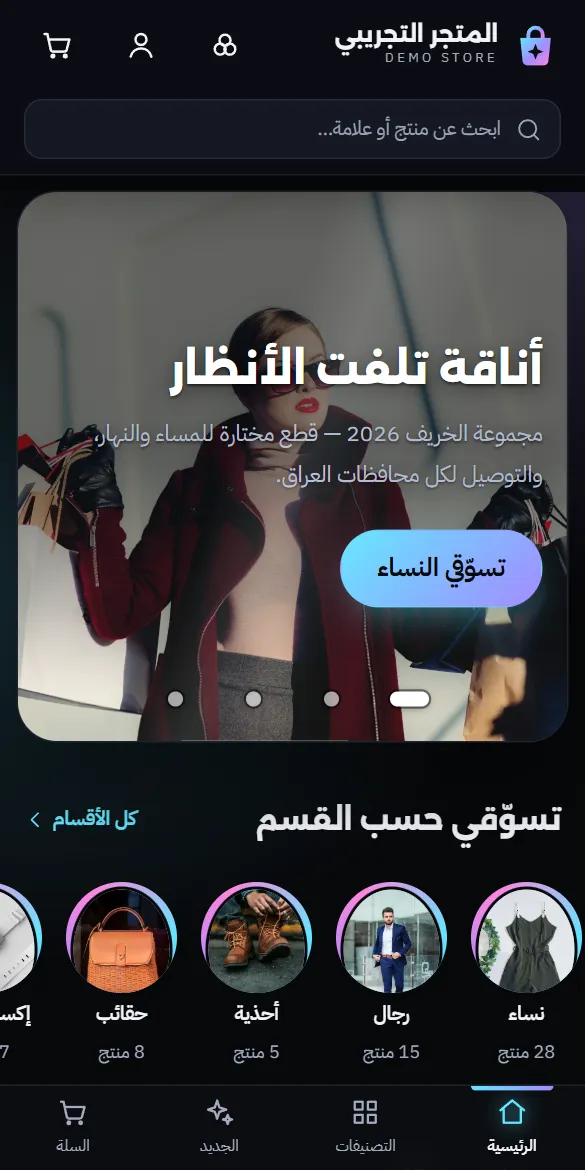
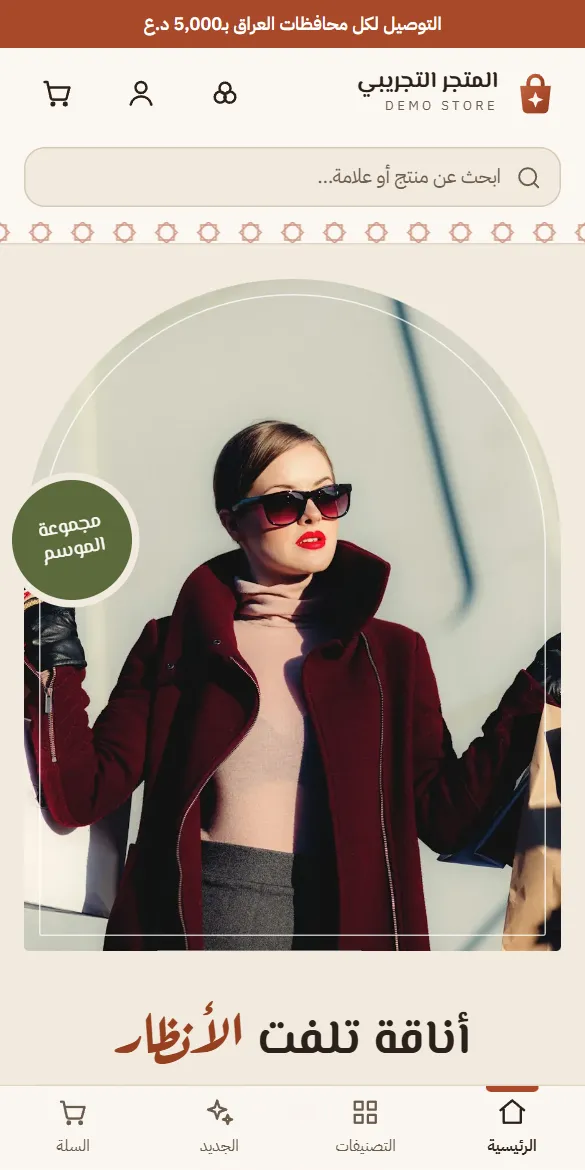
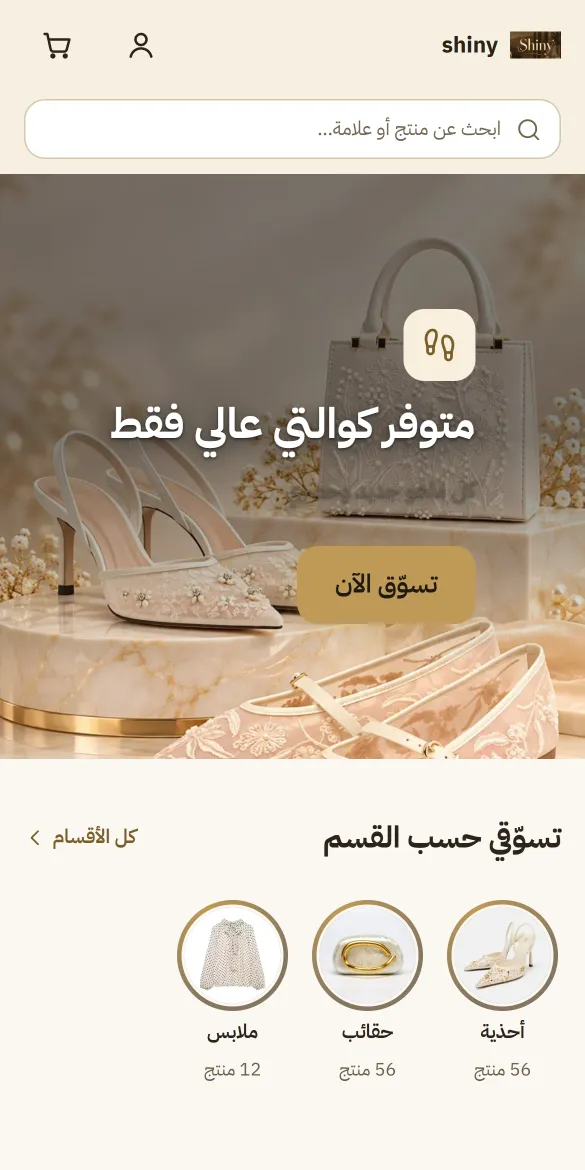
A demo clothing shop running on the same system you get. Open it on your phone and act like any customer. The shop itself is in Arabic.
- Switch between its templates: Couture, Qanater, Runway.
- Open a product and pick a colour and a size.
- Add it to the basket and go through checkout to the end: the address, then cash on delivery.
- Follow the order from the tracking link you get once you confirm it.
- Add it to your phone’s home screen and see it open like an app.
The demo resets every night, so try freely: its orders are not real and no money changes hands. SMS verification codes and the links to couriers are not live in the demo, because each needs an account in the shop owner’s own name.

See the admin panel
It is where you run your products, orders and reports. Leave your name and your phone number to get in.
Complete video tutorials for the platform
Every lesson is a short video, organized by the sections of your store's panel, free with every subscription.
From our work
Built for a real Iraqi shop. The store platform was built first for a shop that sells every day, with its products and its orders, and became the base every store is built on.

How you start
Your store is ready, and you start it yourself.
- 1
Sign up
Subscribe with your email and your phone number, and your store opens within minutes.
- 2
Choose a template
Pick one of the ready templates, and put your shop’s name and logo on it.
- 3
Add your products
Add your products with their photos, prices and options from the admin panel.
- 4
Receive orders
Share your store’s link, and follow every order until it reaches your customer.
Questions we are asked
Is the store under my own name?
Yes. Your shop’s name, logo and identity are on the store, on both plans. A small line at the foot of every page says the store is by Codeator, on both plans as well.
Are there tutorials for using the store?
Yes. Short videos covering every section of the admin panel, free with every subscription. The full list is on our YouTube channel.
Who owns my data and my customers?
You do. Every store has its own database and its own storage for photos, shared with no other store.
Do I need to know programming?
No. You run the store from an admin panel in Arabic: add a product, change a price, follow an order.
Can I use my own domain?
Yes, on both plans. Your store also runs on a subdomain of ours, such as yourshop.stores.codeator.tech.
Do I get an app?
The Pro plan includes a mobile app for your store. On both plans, the store itself installs on your customer’s phone like an app: an icon on the home screen, a full-screen window, and notifications about their order. On an iPhone it has to be installed first for notifications to work.
What is the difference between the two plans?
Both plans carry the complete store, with unlimited orders and products. Pro adds chat with your customers, news, notifications and campaigns, advanced offers, deeper reports with a map of your customers, a loading screen with your shop’s name, a mobile app for your store, faster answers with priority, and more gift points for the AI assistant. The full comparison is in the plans table above.
Can I start for free?
Yes, while a round of the free plan is open, and it then shows at the top of this page: your store free for the first months, and unlimited products and orders. We open it in rounds, and after the free months the subscription is at the Basic plan’s price for your country. No card? Message us on WhatsApp +964 772 332 4433 for another way to pay.
How do I move from one plan to the other?
You change your plan yourself, from Manage your subscription. Your products, orders and customers stay as they are.
Which payment methods can the store take?
Cash on delivery is what is live today: the customer pays the courier in cash at the door. Online payment is not live yet, and connecting it is an addition we agree with you.
Can the store be connected to our accounting system?
Yes, free. We link and sync your store with local systems such as Al-Bayan, on both plans.
Can one system run several stores?
Yes, on a different platform: Faya ERP, which we built, runs many online stores from one system, each store its own tenant. A store on the store platform is one independent store.
Is the store in Arabic?
Yes. Arabic, right-to-left, in every page and in its admin panel. A second language is an addition by agreement.
Our offers, by email
Leave your email, and we will send you Codeator Stores’ offers when they come out.
Tell us about the store you want to open.
What you sell and how you deliver it are enough for a first conversation.